
TripShot
TripShotMaps & Navigation
4.6166.00 Reviews
- Version
- 126
- Installs
- 100.00K
- Age Rating
- Everyone
Screenshots
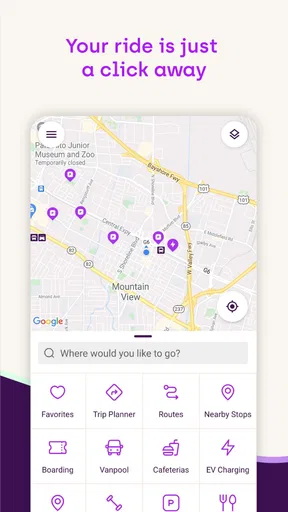
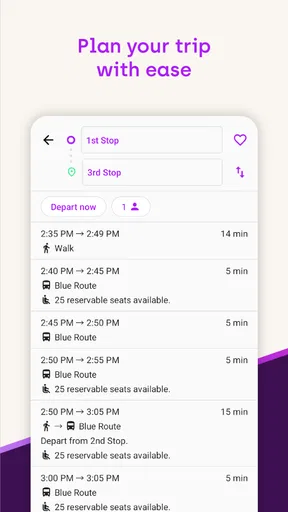
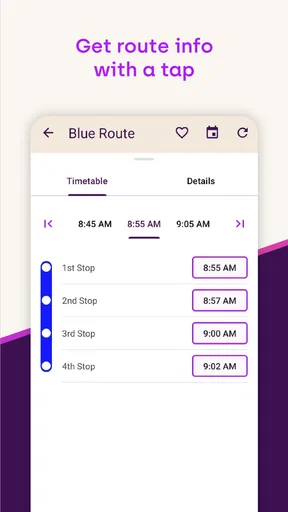
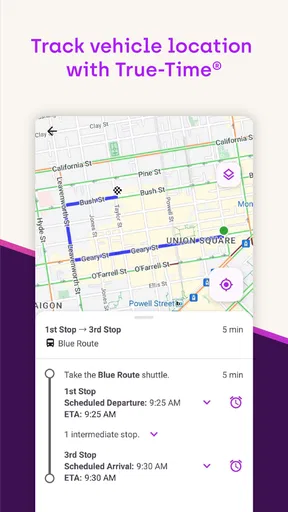
Our Review of TripShot
 Analysis by Appyee
TripShot is the kind of navigation app I would judge less by how attractive its map looks and more by how calmly it helps me make a journey when plans are changing. Developed by TripShot, it sits in the Maps & Navigation category and is free to use, with an Everyone age rating. I found its main appeal in the way it approaches transportation as a connected service rather than simply a digital map.
That distinction matters. A conventional map app is usually built around roads, walking directions, landmarks, and broad public-transport information. TripShot feels aimed at people whose travel depends on a particular mobility network, scheduled service, or organized transportation experience. The useful question is therefore not “Can this replace every map app?” but “Does it fit the way I actually move around?”
Its public presence is encouraging: it has an average rating of 4.6 from around 1.1 thousand ratings, and the app has passed 100 thousand installs. Those figures suggest a focused product with a real user base rather than an abandoned experiment. Still, popularity alone does not make a navigation tool reliable in every situation. With transportation apps, the quality of the experience often depends on current network information, location access, and the service behind the screen.
How TripShot feels when the journey depends on a connection
I find that a journey relying on a connection calls for a little planning before I set off, not just a quick glance at the screen once I am already moving. In the next section, I’ll look at how I’d use TripShot to check the travel context, keep useful details in mind, and switch to a backup calmly if the app cannot update.
Why live connectivity changes the experience
My first practical observation is that TripShot makes the most sense when I have a connection while planning and traveling. A mobility app can only be useful if it can obtain current information about the transportation environment it is designed to show. That may include the availability or status of a service, the latest journey context, or changes that would make an earlier plan less useful. I would open it before leaving, while I still have time to compare options, rather than waiting until I am already standing outside and rushing.
This is where it differs from a paper timetable or a downloaded map. Those tools can remain readable without communication, but they also become stale. TripShot’s connected nature is a strength when the information behind the app is changing. At the same time, it means I would not treat it as a guaranteed replacement for every backup method. If my phone has weak reception, the app may be less helpful at exactly the moment I need certainty most.
I also think the app rewards a two-stage routine. Before a trip, I would use it to understand the available transportation option and prepare mentally for the journey. During the trip, I would keep my phone ready for updates or confirmation, but I would avoid repeatedly reopening the app without a reason. That small habit saves battery and reduces frustration when the network is slow.
A realistic everyday journey
Imagine leaving work for an appointment in an unfamiliar part of town. I would check TripShot while still inside the building, where the phone has a stable connection. Rather than immediately walking toward a pickup point or stop, I would first look at the route context and note the important details: where I need to go, when I need to move, and what part of the journey depends on a live service.
Once outside, I would use the app as a confirmation tool instead of staring at it continuously. If the connection remains good, that can make the trip feel more controlled. If reception drops, I would rely on the details I checked beforehand and keep an alternative map or local information available. This is one of the more useful ways to approach TripShot: let it reduce uncertainty before the journey, but do not make a single connected app your only safety net.
For a daily commuter, that workflow can become quick and natural. For an occasional traveler, it may be more valuable as a planning companion than as a full-time navigation screen. The difference comes down to how predictable the trip is and how much the journey depends on information changing in real time.
Using it in busy mobile situations
TripShot is easier to appreciate when I am moving through a place where stopping to study a large map is inconvenient. On a phone, I want short decisions: am I looking at the right service, am I going in the right direction, and do I need to act now? A mobility-focused interface has an advantage here because it can keep the journey centered on transportation instead of presenting every possible road and business nearby.
That focus can also become a limitation. If I am combining several unrelated travel modes, searching for a small business, or exploring an area without a transportation plan, a broad mapping service may be more flexible. I would use TripShot for the transportation part of the journey and another familiar tool for general orientation when needed. Trying to force one app to handle both jobs can make a simple trip feel more complicated.
There is a useful phone-management habit here: check the route while stationary, then put the phone away while walking whenever possible. This is safer, less distracting, and less demanding on the device. I would also keep the screen brightness sensible and avoid leaving the app open for the entire journey. The app does not need to be the center of my attention every second to be useful.
What happens when the connection is unreliable
The most important limitation is not cosmetic. Connectivity can shape whether a navigation app feels dependable. In a basement, crowded venue, underground passage, rural area, or building with thick walls, the phone may struggle to communicate. When that happens, I would expect less confidence from any service that relies on current information, including TripShot.
My advice is to prepare before entering a weak-signal area. Check the journey early, read the key details rather than assuming I will remember only the app name, and take a quick mental note of the direction and timing. If the trip is important, I would also keep a second source of basic orientation. This is not a criticism unique to TripShot; it is a sensible response to the difference between a live mobility service and a static reference.
Another possible source of friction is a changing plan. If I switch destinations, miss a departure, or decide to travel at a different time, I would refresh the app before acting on old information. A screen that was accurate a few minutes earlier may no longer describe the situation. That habit is especially important when the journey involves a scheduled or managed service rather than an ordinary walk.
Recovering from a failed check
When an app does not respond immediately, repeatedly tapping the same screen is rarely the best recovery method. I would first check whether the phone has a usable connection, then move to a place with clearer reception if possible. After that, I would reopen or refresh TripShot and give it a moment rather than rapidly switching between screens.
If the information still does not appear, I would fall back to the notes I made before leaving and use a general map or local signage for the basic direction. For an important appointment, I would contact the transportation provider or the person expecting me if that is practical. The key lesson is to separate two problems: the app may be unable to update, while the journey itself may still be possible. Keeping those questions separate helps me avoid panic.
I would also avoid uninstalling or changing settings in the middle of a trip unless there is no alternative. Troubleshooting on the move can remove the one piece of information that was already visible. A better routine is to test the app before departure on a normal connection, especially if I am using it for an unfamiliar route or a time-sensitive commitment.
Being careful with mobile data
TripShot is free, which makes it easy to try, but “free” does not mean a journey has no practical cost. Connected map and transportation use can consume mobile data and battery, particularly if I keep refreshing or leave the screen active. I would use Wi-Fi to prepare when available, then make only the checks that matter once I am outside.
A data-conscious approach is simple. Plan the route before leaving, avoid refreshing just to watch the screen change, and close the app when I have finished a decision. If I am traveling for a long time, I would carry a charger or start with enough battery for the whole trip. These habits are not about limiting TripShot unfairly; they are about matching a connected tool to the realities of a phone.
I would also pay attention to the phone’s location behavior. Navigation is more useful when the device can determine where I am, but I prefer to understand which settings I have enabled and to turn off unnecessary access when I am done traveling. That gives me a better balance between convenience and control. The right setup may vary by device, so I would review the system’s location controls rather than assuming every setting is ideal.
Where it fits beside ordinary alternatives
Compared with a general-purpose map, TripShot appears more specialized in its transportation perspective. A broad map is usually the better choice when I need restaurants, walking exploration, driving directions, or a wide view of everything around me. TripShot is more appealing when transportation itself is the central problem and I want an app built around that context.
Compared with a printed timetable or a saved note, the app has the advantage of being easier to revise when the journey changes. The trade-off is dependence on the phone and its connection. A printed reference is limited but predictable; a connected app is potentially more current but more vulnerable to signal, battery, and device problems.
Compared with checking a transportation provider’s information manually, TripShot may offer a more direct mobile workflow for people already using the service environment it supports. However, I would not assume that a single app is automatically the best source for every disruption or unusual situation. When a journey is critical, I would verify the most important detail through another available channel if something looks inconsistent.
Who will appreciate it most
I would recommend TripShot to commuters, organized travelers, and people whose daily movement is tied to a managed transportation service. It is also a sensible option for someone who wants a focused mobility tool instead of a map filled with unrelated places and options. The app’s free price lowers the barrier to testing it, and its Everyone rating makes it approachable for a broad audience.
I would be more cautious about recommending it as the only navigation app for hikers, road-trip drivers, tourists who want detailed local discovery, or anyone who regularly travels through areas with unreliable reception. Those users may need broader mapping, stronger offline preparation, or more specialized route information. TripShot can still have a place in their toolkit, but I would not make it the sole source of direction.
The app’s maturity is another positive sign. It was released on June 21, 2015, and its current version is 126, so this is not a brand-new project still finding its basic shape. That history does not guarantee a perfect experience on every phone, but it does make me more comfortable treating it as an established app rather than a temporary trial.
Small habits that make it more dependable
My preferred routine is to plan while connected, identify the part of the trip that may change, and then use the app sparingly while traveling. I would not wait until the last possible moment to open it. A few minutes of preparation can make a major difference if the next location has poor reception.
I would also compare the app’s information with the physical environment. If a sign, driver, station display, or staff instruction conflicts with what I saw earlier, I would investigate instead of blindly following the screen. Connected information is useful, but real-world context can reveal a change before I have had time to refresh.
Finally, I would keep a simple backup plan for important journeys. That might mean remembering the destination, noting the relevant timing, or knowing where to ask for help. The best use of TripShot is not to surrender all judgment to the phone. It is to make my own decisions faster and with better transportation context.
My connectivity verdict
After looking at how it fits into real mobile travel, I see TripShot as a focused companion for connected transportation rather than a universal replacement for every map. Its strongest moments come before and during a planned journey, when current information can make a managed mobility service easier to understand. Its weakest moments are the predictable ones: weak signal, low battery, stale information, or a trip that falls outside its specialized purpose.
The practical verdict is simple: use TripShot to reduce transportation uncertainty, but prepare for the moments when your phone cannot update. That balance lets the app do what it is best suited for without expecting it to solve every navigation problem.
With its free access, solid 4.6 average, and established development history, I think it is worth trying if your routine matches its mobility-focused design. I would keep a general map available for broader exploration and a basic backup for important trips. Used that way, TripShot feels less like a replacement for everything and more like a useful, connected layer for getting from one place to another with fewer surprises.
Verdict
Strengths of TripShot
- Real-time vehicle tracking helps riders plan pickups more accurately.
- Mobile ticketing and trip details keep travel information in one place.
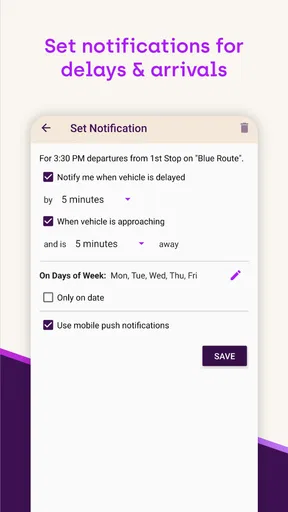
- Push notifications can alert users about delays, changes, or arrivals.
- Designed for commuter programs, campuses, and workplace transportation.
- Route and stop information is easy to check while on the move.
Limitations of TripShot
- Features depend on whether the local transportation provider supports TripShot.
- Live tracking may be inaccurate when GPS or network coverage is weak.
- Some users may need an organization-issued account to access services.
- Service availability and routes vary significantly by city or employer.
- Background location access may increase battery consumption during use.
Similar Picks in This Category
View All
Uber - Request a ride
Uber Technologies, Inc.4.7


inDrive. Rides with fair fares
® SUOL INNOVATIONS LTD4.8

Yandex Go: Taxi Food Delivery
Mikromobilnost LLC Belgrade4.8

Bolt: Request a Ride
Bolt Technology4.8

Rapido: Bike-Taxi, Auto & Cabs
Rapido Bike Taxi4.8
Frequently Asked Questions
What is TripShot and what can I use it for?
TripShot is a transportation management and mobility app designed to help users plan, book, and track rides provided by participating organizations, employers, universities, residential communities, or transit operators. Depending on the service available in your area, you may be able to view routes, check schedules, reserve a seat, receive pickup details, and follow a vehicle’s location in real time. Its features can vary by provider and location.
Do I need an invitation or organization account to use TripShot?
In most cases, TripShot is connected to a specific transportation program rather than being a completely open ride-booking service. You may need an invitation, an approved email address, an access code, or an account created through your employer, school, residential community, or transit provider. Before downloading, check whether your organization supports TripShot and confirm which login method and eligibility requirements apply to your service.
Can TripShot track my ride and show real-time vehicle information?
TripShot commonly provides live transportation information, such as estimated arrival times, vehicle locations, route progress, pickup instructions, and service alerts. However, the accuracy of these details depends on GPS availability, traffic, driver updates, and the transportation provider’s system. The app should be treated as a helpful guide rather than a guarantee, so allow extra time and pay attention to official notifications or changes.
Can I reserve, cancel, or modify a ride through TripShot?
If your local TripShot program supports reservations, the app may allow you to select a route, date, time, pickup point, and destination before confirming a trip. Some services also let passengers cancel or change bookings within a specified time limit. Policies differ considerably between providers, including no-show rules, reservation deadlines, and seat availability, so review the instructions shown in your account before booking.
Is TripShot free, and what permissions does it require?
Downloading TripShot is generally free, but access to rides, fares, subscriptions, or booking services depends on the organization operating the transportation program. Some services may be employer-sponsored, while others can require payment or a valid transit benefit. The app may request location, notification, and account permissions to provide arrival alerts, navigation-related features, and service updates. You can review and adjust permissions in your device settings.
